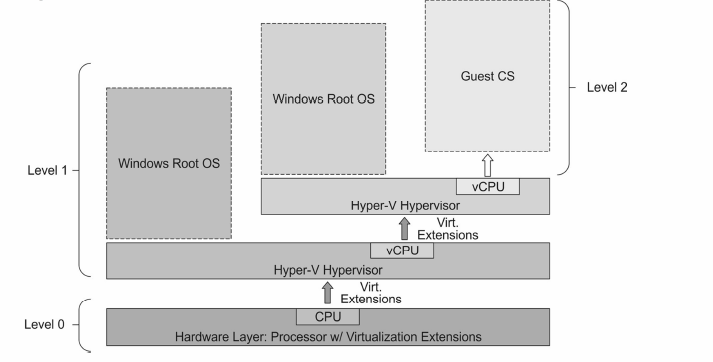
the Windows Root OS takes full control of virtualization extensions (observe the arrows), and expose them to the guest OS.
B
nested virtualization. Hyper-V has been configured to expose virtualization extensions to its guest VM. A guest VM can take advantage of this, and install its own hypervisor. It can then run its own guest VMs.
C
nested virtualization. It is necessary to use the following PowerShell command to make it work properly: Set-VMProcessor -VMName -ExposeVirtualizationExtensions $false
D
that is possible to use other virtualization applications like WMware in Hyper-V virtual machines, and nested virtualization will succeed.
E
once Hyper-V is installed, the hypervisor hides this capability from guest virtual machines, preventing guests virtual machines from installing Hyper-V. So, nested virtualization is not possible.